

How to reach Level 50 with friend codes and roulette
Want to level up in Pokerist for an EarnX offer? Start with an eligible friend code, collect the available chip bonuses, and use roulette to work through the early levels. This guide walks through the free route I used, then explains the optional coupon promotion to check before spending anything.
I reached Level 50 in about 30 minutes without buying chips. That was my experience, not a guaranteed completion time. Your starting chips, referral reward, roulette results, and offer requirements can change the outcome.
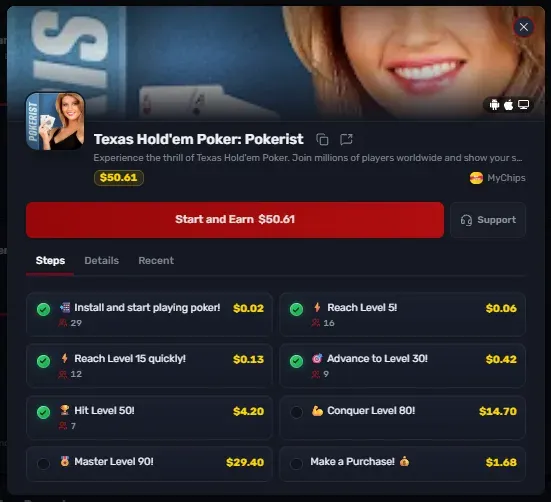
The EarnX offer shown has completed tasks through Level 50; Level 80, Level 90, and the purchase task remain unchecked.
Pokerist uses virtual chips that cannot be redeemed for money. Any EarnX reward comes from meeting the separate offer requirements. Check the version of the offer available to your account before starting. [1]
Pokerist rewards on EarnX
The screenshot shows a MyChips offer with $50.61 in total available task rewards. These amounts are an example from this offer; your live task list and deadline take priority.
| Task | Reward | Total through milestone |
|---|---|---|
| Install and start playing | $0.02 | $0.02 |
| Reach Level 5 | $0.06 | $0.08 |
| Reach Level 15 | $0.13 | $0.21 |
| Reach Level 30 | $0.42 | $0.63 |
| Reach Level 50 | $4.20 | $4.83 |
| Reach Level 80 | $14.70 | $19.53 |
| Reach Level 90 | $29.40 | $48.93 |
| Make a purchase | $1.68 | $50.61 with all tasks |
Start through the EarnX offer
Open Pokerist from your EarnX task page and follow its installation instructions. Save the task list, time limit, device requirements, and purchase conditions before you begin. Avoid switching to a community referral download link after starting the offer; use the in-game player ID field for the friend-code step.
If you start as a guest, use the game’s Sign In option to secure that existing progress with a supported account method. Keep the same player ID so the friend rewards and offer progress stay with the account you started.
The registration gallery below shows the blank form and completed example. Use an email account you control, and check that your player ID and level are unchanged after registration.
Register your Pokerist account
On the Register screen, choose Sign up with email. Enter your email, create a password, and repeat it in Confirm password. The completed example shows where to tap Create; use your own details.
Registration screenshots
Use a Pokerist friend code early
Before using up your starting chips, open Friends and select Invitations. This is where you enter the ID of the player who invited you. The Search friends tab is for finding players; the invitation field is the relevant place for the referral bonus.

Friends → Invitations shows the player ID field and referral milestones.
Search Google, Facebook, or Reddit for “Pokerist friend codes” or “Pokerist referral codes.” Look for an active player with a recent post, then check the reward displayed in your game after entering their ID.
This invitation screen displays +2,000,000 chips alongside levels 5, 10, and 20, without a per-milestone breakdown. Do not assume the amount is paid three times. Level 15 is an EarnX task in this example, not a referral milestone shown here.
VIP ranks and referral bonuses
Public player posts advertise the following amounts. These are player-reported referral bonuses, not an official schedule or confirmed payments to a new account. The VIP 4 example was cross-posted from Blackjackist to the Pokerist community. [6, 7]
| Inviter VIP level | Advertised chip bonus | Source |
|---|---|---|
| VIP 4 | 12 million | Player post [6] |
| VIP 5 | 16 million | Player post [7] |
The VIP 5 poster says they check the new player’s level and activity before adding them. Choose someone active, but confirm the actual reward and conditions in your game. These posts do not establish a universal extra payment simply for being added back.
For the current full VIP reward list, open your profile’s VIP section. A developer announcement introduced 13 levels in 2020; it does not provide a current referral payout chart. [2, 3]
Open roulette inside Pokerist
Use Select game near the top of the home screen to switch to roulette within the same app. You do not need a separate roulette download for this walkthrough. [4]

The home screen includes Friends, free chip rewards, and the game selector near the top.
Choose a table with a minimum bet that fits your chip balance. The lobby offers European, French, and American roulette. The pictured single-zero layout is the example used below; always check the rules for the table you choose.
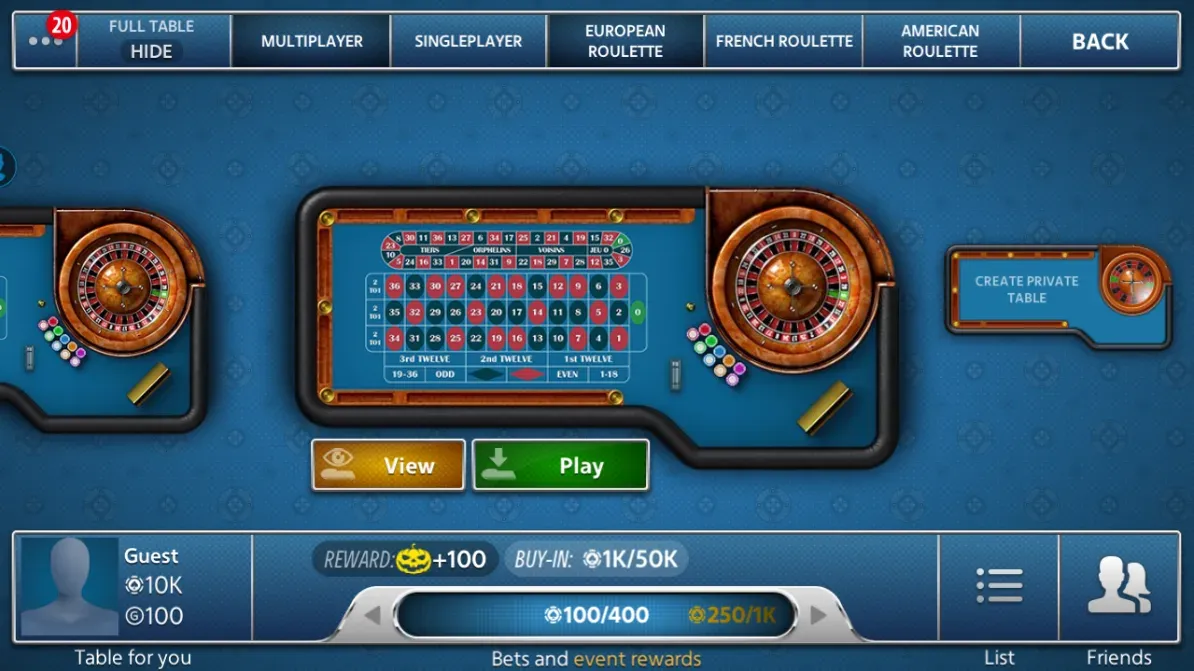
Review the table type and betting limits before selecting Play.
Collect any available daily bonus, free chips, and earned rewards along the way. A larger free balance gives you more room to continue if a roulette round loses.
Bet equal amounts on red and black
The method I used was to place the same number of chips on red and black, play the round, and repeat while watching my level progress and chip balance. Check that your current game version awards progress before increasing the stake.
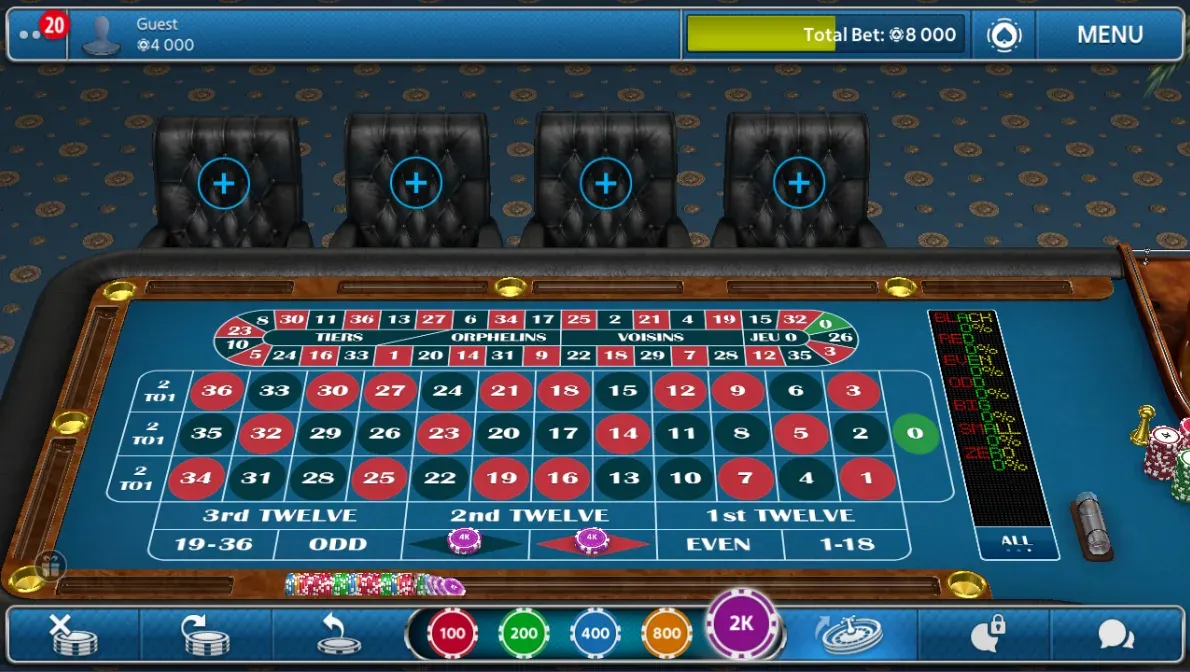
The example shows 4,000 on each color, for an 8,000-chip total bet.
Under standard even-money payouts on a single-zero table, the winning color returns twice its stake, including the original bet. That covers the losing color when red or black lands. Zero is the loss case:
| Result | Red bet | Black bet | Net chip change |
|---|---|---|---|
| Red | +4,000 | −4,000 | 0 |
| Black | −4,000 | +4,000 | 0 |
| Zero | −4,000 | −4,000 | −8,000 |
Keep chips in reserve. The screenshot illustrates the bet placement, but its 8,000 total bet with only 4,000 left is an aggressive stake for the displayed balance. One zero would remove the entire amount on the table.
Adding a small bet on zero can offset some or all of a zero loss, depending on the amount and payout. It also costs chips whenever a color wins. It does not make roulette risk-free. On a fair single-zero wheel, zero has a 1-in-37 chance on each spin; the 2.70% house edge still applies to standard bets.
There is no verified basis here for saying that betting your whole balance makes zero more likely. Keep your stake small enough to survive losses rather than trying to predict when zero will appear. Pokerist publishes an RNG certificate. [5]
Check the coupon before buying more chips
Once you have collected your free rewards, look through the Season Pass rewards for a coupon. The screenshot shows a coupon on the free reward track at pass tier 4. That pass tier is separate from your main player level.

The Season Pass reward track includes a coupon; open it to check its value and terms.
My walkthrough notes mention a $7 coupon, but its value and application are not visible in these screenshots. Open the coupon to confirm the amount, eligible products, and expiry before counting it toward a purchase.
Sign in to Games Hub
The walkthrough uses games-hub.app/sign-in with the email account registered in Pokerist. Confirm the destination through the in-game offer or official support, then check that the signed-in player ID matches your game account. The email shown is the same walkthrough example used above.
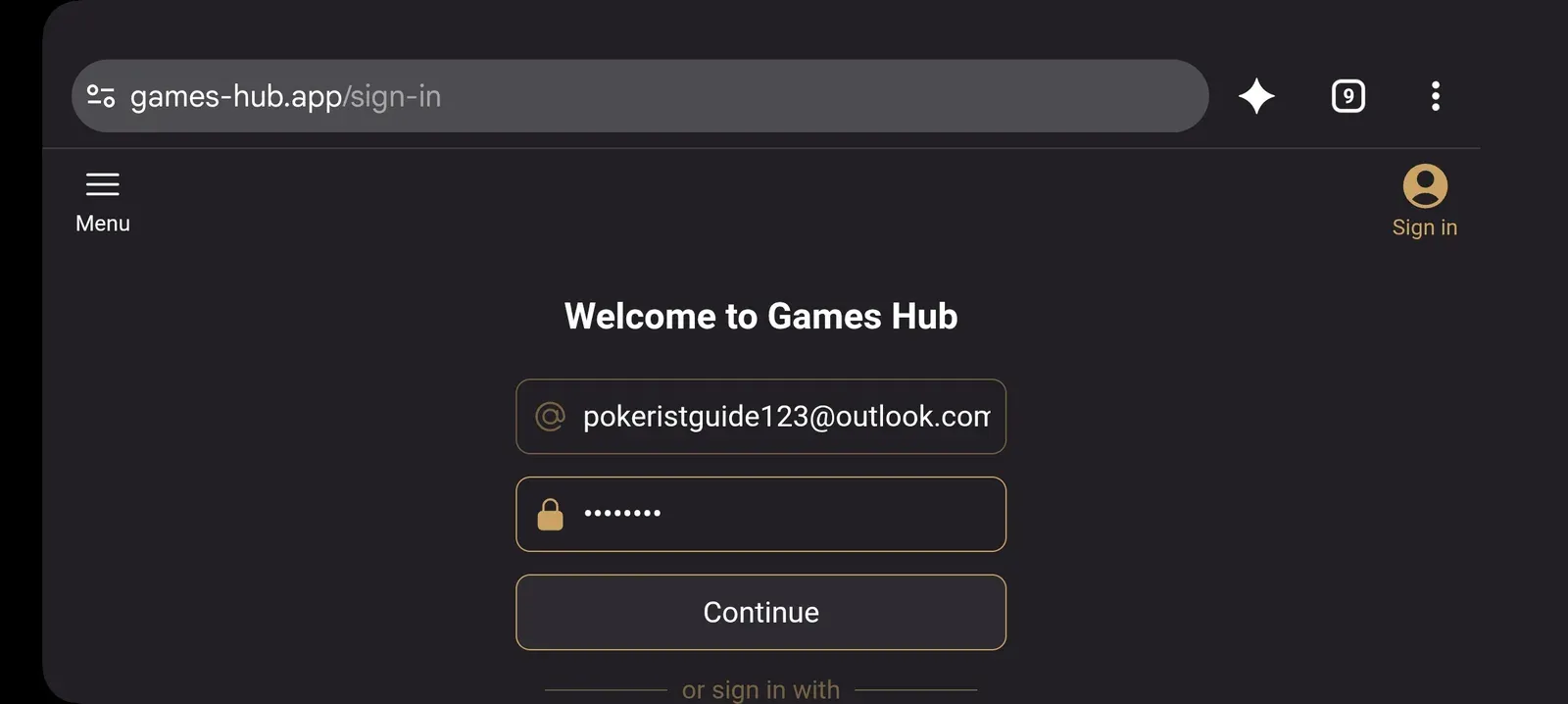
The Games Hub sign-in screen from the walkthrough.
Check the Games Hub bonus and pass offers
The events offer shows 100,000 free chips and a separate 300% purchase bonus. If it appears for your account, review the conditions and tap Claim. The 300% applies to a purchase, not to the free chips.
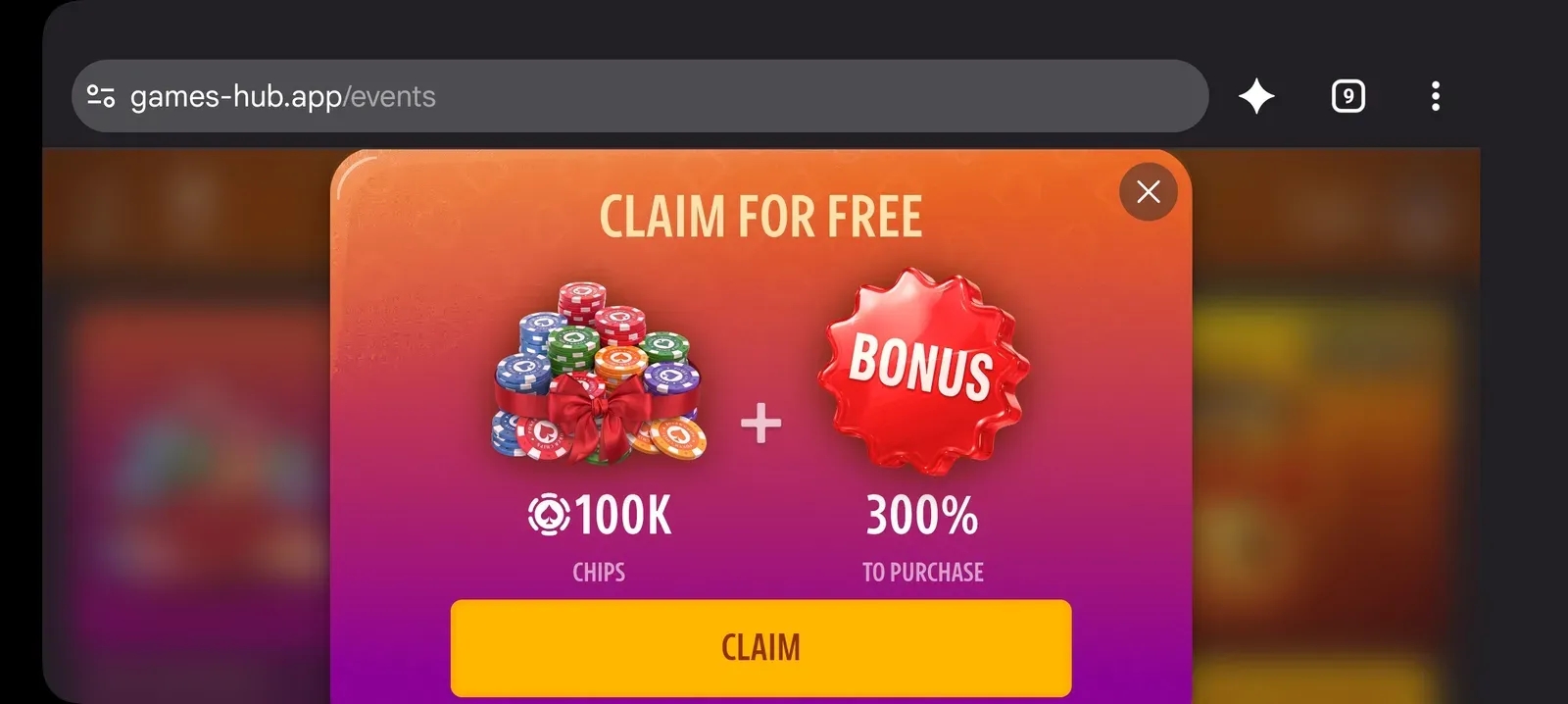
The events offer shows 100K chips and a separate 300% purchase bonus.
The store screenshot names the products Elite Pass and Elite Pass Plus. Its banner advertises a 300% bonus to the first purchase. Compare the amount under Claim now with the separate season rewards before paying.
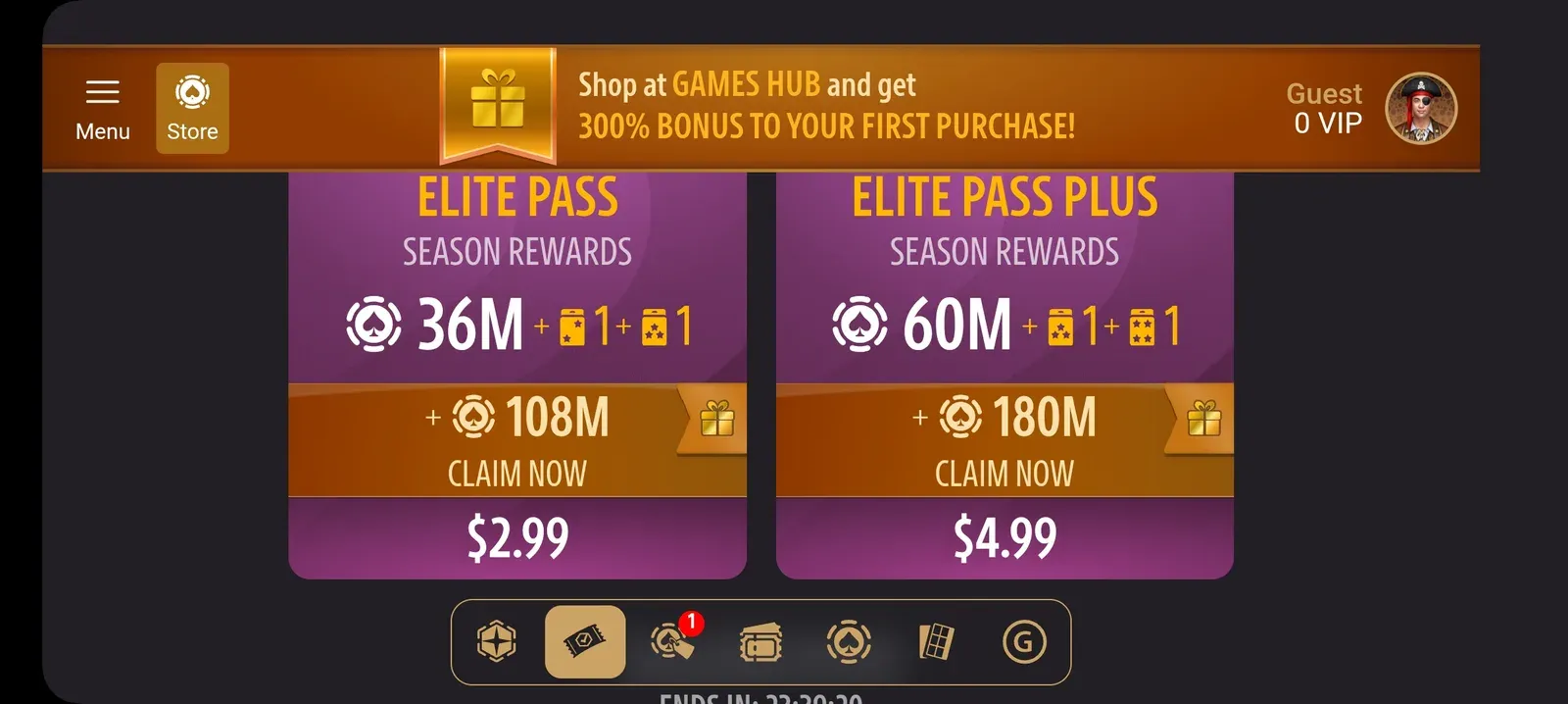
The captured offer lists Elite Pass at $2.99 and Elite Pass Plus at $4.99.
| Pass | Shown price | Claim now chips | Season chips |
|---|---|---|---|
| Elite Pass | $2.99 | 108 million | 36 million |
| Elite Pass Plus | $4.99 | 180 million | 60 million |
These are the displayed offers in my screenshots, not confirmed purchases or prices guaranteed for every account. Season rewards may require progression or later claims. The screenshots do not show a $7 coupon being applied; check the final price, conditions, and account before checkout.
The EarnX purchase task shown pays $1.68. Check whether an external-store purchase qualifies. A $2.99 purchase would cost $1.31 after that reward if it qualified and credited, before any tax. Buying chips is optional.
Decide whether to continue past Level 50
After reaching Level 50, check that the milestone appears on EarnX, then compare your remaining chips and time with the Level 80 and Level 90 requirements. The screenshot confirms completion through Level 50 only. It does not demonstrate how long the later milestones take or whether a particular chip purchase will be enough.
In this offer, Level 80 adds $14.70 and Level 90 adds another $29.40. Those larger rewards make the later targets tempting, but they are only earned when you satisfy the task conditions. Do not count them as guaranteed money when deciding whether to buy more chips.
Optional Keno Chili detour
My notes also included trying Keno Chili at 2 million chips per round. Treat that as an optional detour with a separate chip limit, not a required leveling step. Losing rounds can quickly consume the balance you wanted to use for roulette. If your goal is the level milestone, avoid spending your reserve chasing a large win and return to the leveling method you have already checked.
Pokerist leveling questions
Can you reach Level 50 for free?
I did it without buying chips, using friend rewards and roulette. That does not guarantee the same result for another account, especially if the available rewards or game progression change.
Does it always take 30 minutes?
No. About 30 minutes was my reported result. Starting balance, bonuses, bet size, and losses affect how quickly you progress.
Why do both red and black bets lose sometimes?
Green zero is neither red nor black. On a standard single-zero table, both color bets lose when it appears. American roulette commonly adds a second green pocket, 00.
Which levels give referral chips?
The invitation screenshot lists levels 5, 10, and 20. Check your own invitation screen for the current requirements and amounts.
Should you buy chips just to finish the offer?
Only consider a purchase after checking the current price, remaining requirements, and your spending limit. Extra chips do not guarantee Level 80, Level 90, or an EarnX payment.
Ready to try it? Open your live Pokerist task on EarnX, check the conditions, and start with the free rewards before deciding whether the optional purchase route makes sense for you.
Sources
[1] Pokerist support — virtual currency and real money
[2] Pokerist support — VIP levels and the in-game reward list
[3] KamaGames — 13 VIP levels announced in 2020
[4] Pokerist support — switching games within the app
[5] Pokerist — RNG certificate page